Stopped Vehicle
How it works
The Stopped Vehicle rule generates an event when a vehicle comes to a stop and remains stationary inside a defined region of interest for longer than a set period of time (the "dwell time"). It is designed for use cases such as detecting vehicles stopped on hard shoulders, in tunnels, at junctions, in no-stopping zones, or blocking restricted areas. The rule applies to vehicle-class targets — car, van, bus, truck, and two-wheeled vehicles (motorcycle, bicycle) on standard cameras. On thermal cameras the same vehicle classes are supported.
How it detects
IRIS+ continuously detects and classifies targets in the scene using deep learning, and tracks each target's movement over time. When a target classified as a vehicle stops moving within the region of interest and stays stopped for the full dwell time you have configured, the rule triggers an event. Each event includes a short video clip showing several seconds before and after the detection, with a bounding box drawn around the vehicle that triggered it. Only vehicles are evaluated by this rule — people and other objects do not trigger it.
How to set up
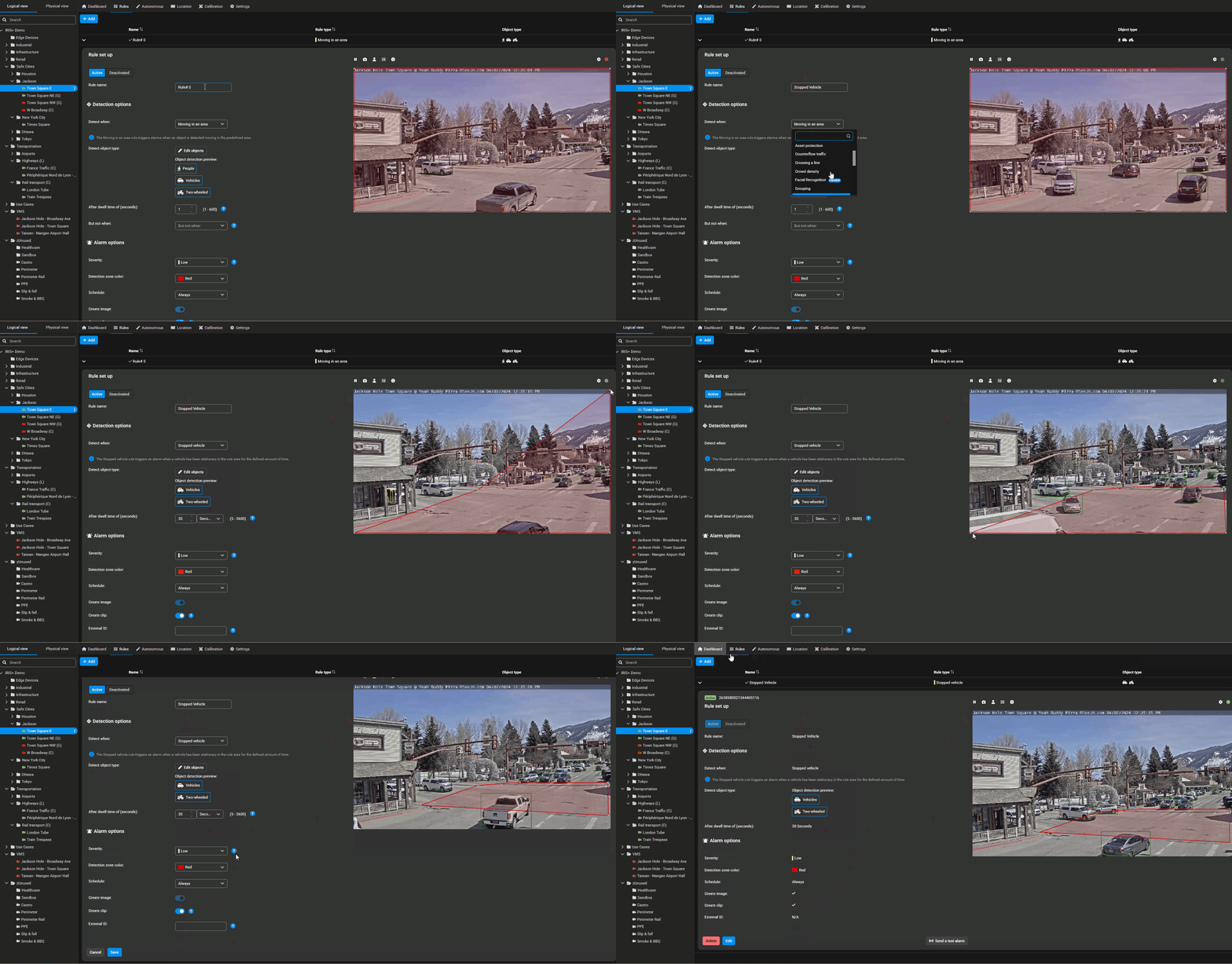
- Open the camera you want to configure and add a new rule.
- Select Stopped Vehicle as the rule type.
- Draw the region of interest on the scene — the area where a stopped vehicle should be detected.
- Set the dwell time — how long a vehicle must remain stationary before an event is generated.
- (Optional) Select which vehicle target types the rule should apply to.
- Save and activate the rule. You can run it alongside other rules on the same camera, and schedule when it is active.
What to expect
- An event is generated only after a vehicle has been stationary for the full dwell time you set.
- Every event comes with an event clip and a bounding box around the vehicle.
- The rule performs best with clear vehicle visibility in the region of interest. Very short dwell times may increase sensitivity to brief stops (e.g. traffic queues), while longer dwell times reduce false alerts.
- Note on long dwell times: on some camera/processing configurations, dwell times set beyond ~10 minutes may not be honored accurately and can lead to missed detections. If you need very long dwell times, validate the behavior for your setup.
- Path view is not available for Stopped Vehicle events, and color filtering is not supported for this rule.