Common Genetec Troubleshooting
Before you troubleshoot: confirm you're on the right versions
Known issues are typically found in an outdated plugin or gateway. Confirm all three of these first:
Component | Minimum version to be on | Where to check |
|---|---|---|
IRIS+ Genetec Embedded Plugin | 2026.2.18.31 | Windows Apps & features, or the plugin's About screen |
IRIS+ VMS Gateway | 2026.4.7 | VMS Gateway installer / service version |
Genetec Security Center SDK | 5.13 (5.13.2.0 b2114.23) | Genetec Config Tool → About |
If any component is older, download the current build from Available Downloads Available Downloads, uninstall the old one, and reinstall before continuing. Do not troubleshoot on an old build.
1. Verifying that IRIS+™ events are received in Genetec
Use this when alarms are configured but you are not sure IRIS+ events are actually reaching Security Center.
How to check:
- In the Genetec Config Tool, open your event-to-action rule and run the automation test — this confirms the rule itself fires correctly.
- Open Security Desk and go to the Monitoring task.
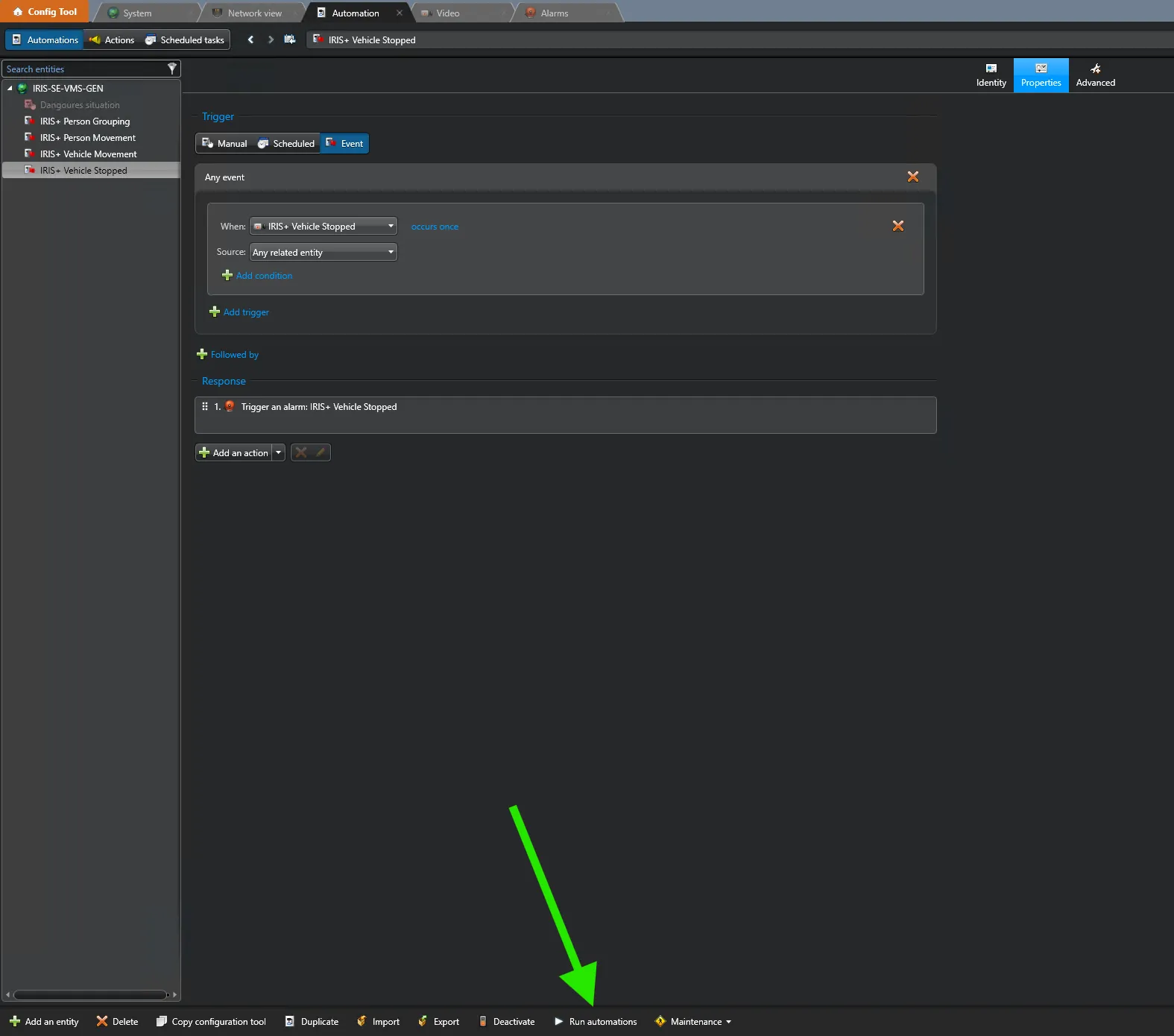
- In the bottom-left corner of the monitoring pane, enable the event/activity option (the monitoring toggle).
- Send a test alarm — either a Genetec test alarm, or a live alarm triggered from IRIS+.
- When the event is received, a bar appears in the monitoring pane confirming the event came from the SDK.
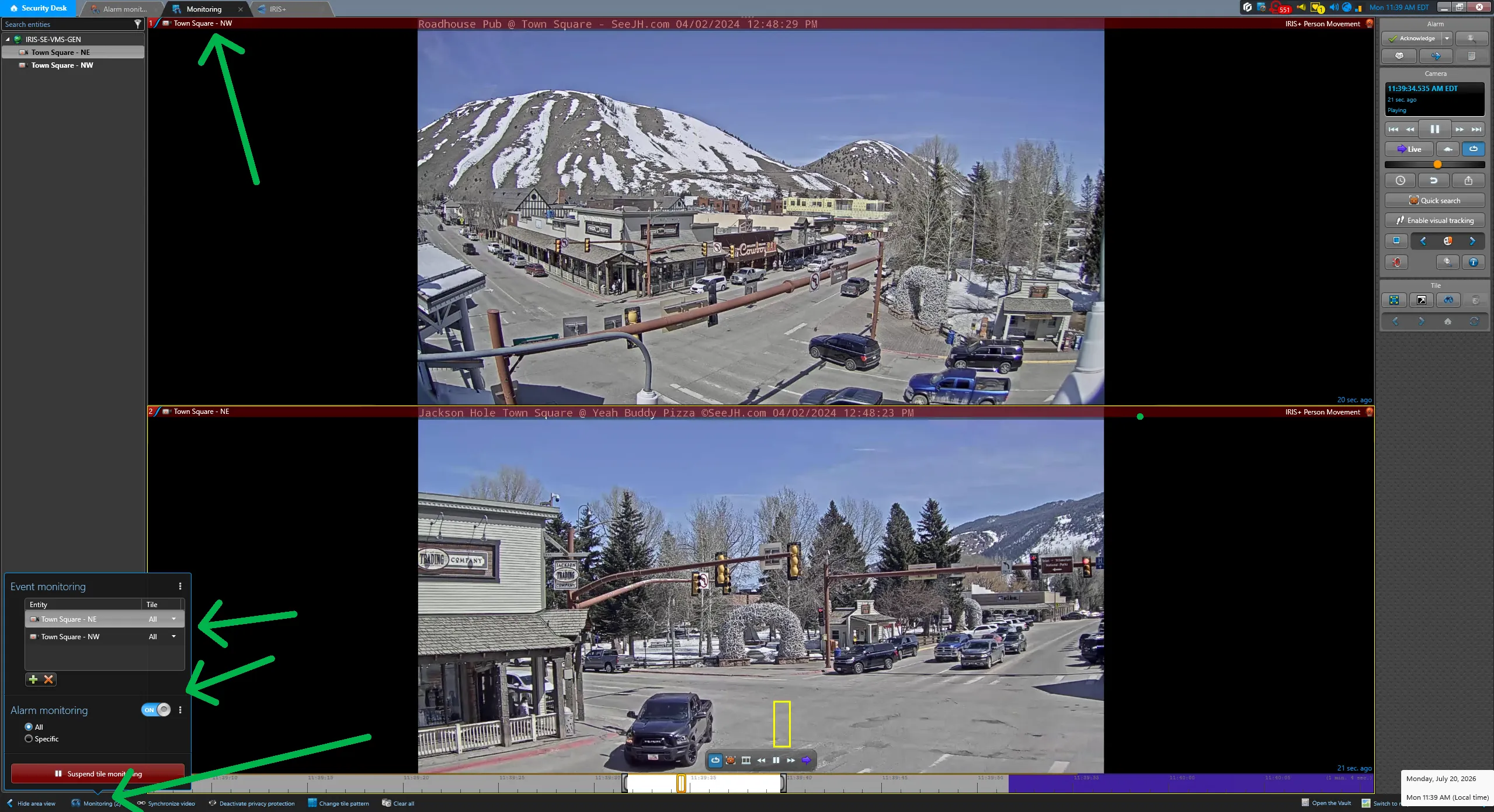
If the bar appears, IRIS+ events are being delivered into Genetec and the problem is on the rule/alarm side, not the integration. If nothing appears, continue to Section 2.
2. Embedded plugin is installed but does not appear or load in Security Center
Symptom: The IRIS+ Genetec Embedded Plugin has been installed, but it does not show up / does not load inside Security Center. It often works fine on a machine where the Genetec Server and Security Center are on the same computer, but fails on split (server-separate) setups.
Cause: Two known causes:
- The plugin-definition XML that the installer places is not being picked up by Genetec.
- The IRIS+ integration settings (UserURL, ApiKey, ApiToken) are stored under the Genetec area of the Windows registry, and Genetec can misread that entry as a broken plugin and refuse to load it.
How to check: Confirm the plugin is installed (Windows Apps & features), then confirm it is not listed among the loaded plugins inside Security Center.
Fix:
- Make sure you are on Embedded Plugin 2026.2.18.31 or newer (see the first ).
- As a temporary workaround, the plugin can be registered manually by adding the registry values Genetec uses for development-time registration. This is a temporary measure only — per Genetec's own guidance it is meant for development/testing, not production.
- The permanent fix moves the integration settings out of the registry and into a settings file at: C:\ProgramData\Irisity AB\Genetec\Settings Newer plugin builds do this automatically during installation (existing registry settings are copied to the file).
When to escalate: If the plugin still won't load after upgrading and confirming settings, raise it with the support team.
3. Embedded plugin installation fails during verification
Symptom: The installer fails partway through — specifically at the step where the URL, API key and token are verified. The failure is intermittent; it may not reproduce on a clean dev/test machine.
Cause: A bug in older plugin builds combined with incorrect or unreachable connection settings.
How to check:
- Confirm the UserURL is correct and reachable from the machine (open it in a browser on that machine).
- Confirm the ApiKey and ApiToken are valid and copied without stray spaces.
Fix: Install Embedded Plugin 2026.2.18.31, which contains the fix for the verification-step failure, then re-enter the URL / API key / token carefully.
When to escalate: If verification still fails on the current build with confirmed-good settings and network access, escalate to support with the installer log.
4. IRIS+ is consuming more Genetec licenses / certificates than expected
Symptom: In Genetec, the IRIS+ integration is using more certificates than it should. Correct usage is 1 certificate for the plugin (2 if the VMS Gateway is also running). Affected builds showed 2 certificates used (3 with the gateway running).
How to check: In Security Desk, go to About → Licenses → Certificates (with the IRIS+ / Alarm monitor tabs closed) and look at the IRIS+ certificates in use.
Fix: Upgrade the Embedded Plugin to 2026.2.18.31, which restores correct single-certificate usage.
When to escalate: If certificate usage is still too high after upgrading, escalate to support about the integration.
5. Cannot add cameras in Genetec 5.13.3 — no "Video Unit" button
Symptom: In a Genetec 5.13.3 environment you cannot add cameras, and the "Video Unit" button is missing entirely.
Cause: This is a Genetec licensing issue, not an IRIS+ issue. The Genetec license is missing the required "Number of cameras and analog monitors" feature, so Genetec itself won't let you add video units.
How to check: In the Genetec Config Tool, review the license and confirm whether the Number of cameras and analog monitors entitlement is present.
Fix: The customer needs the correct Genetec license feature added by Genetec. There is nothing to change on the IRIS+ side.
When to escalate: This sits with the customer's Genetec licensing / Genetec directly.
6. VMS Gateway keeps re-sending the same events (event loop)
Symptom: The VMS Gateway gets stuck in a loop and repeatedly resends the same events to Genetec, flooding Security Center.
Cause: A defect in older gateway builds.
Fix: Upgrade the IRIS+ VMS Gateway to 2026.4.7 or newer, which resolves the resend loop.
When to escalate: If looping continues on the current gateway build, capture gateway logs and escalate to support.
7. Large deployments — VMS Gateway camera capacity
Symptom: Instability or failures on very large sites (in the region of several thousand cameras).
Cause: Current VMS Gateway builds have a practical camera ceiling; very large counts (around 7,000 cameras) are not yet fully supported.
Fix / status: A gateway build with support for large-scale (~7,000-camera) deployments is in progress. For now, confirm the site's camera count against the current supported capacity before committing, and stage large sites accordingly.
When to escalate: For any planned deployment near this scale, involve support early rather than after install.
8. "Search for Similar" pop-up does not appear in the Genetec embedded tab
Symptom: In the IRIS+ investigation view inside the Genetec embedded tab, the "Search for similar" pop-up does not appear.
Cause: Resolved defect in older portal versions.
Fix: Ensure the IRIS+ portal is on 2026.3 (or 2026 R2) or newer, where this is fixed.
When to escalate: If it still does not appear on 2026.3+, escalate to support.
10. When to escalate, and to whom
Before escalating, always confirm you have (a) the current versions from Available Downloads, and (b) the relevant logs. Contact support to inquire about any of the following topics below:
- Integration / plugin behaviour.
- Architecture / plugin-loading / deeper system questions.
- General customer support routing.
When you escalate, include: Genetec Security Center version, IRIS+ plugin and VMS Gateway versions, whether server and Security Center are on the same or separate machines, and the exact error/log lines.