IRIS+™ 2026.1
Irisity is always looking for opportunities to provide the best features and improvements for your needs. If you want to use the latest updates to the IRIS+ cloud, we highly recommend you read through our release content. Updates will be automatically applied to your system according to our policies.
This release will be accessible to all customers using the cloud-hosted system on 24-Feburary during our service maintenance window.
What's new?
Additional regional language support
IRIS+™ now supports additional regional languages for customers operating in non-english speaking regions. To access, simply locate the language options in the user settings menu at the top right side of the page.
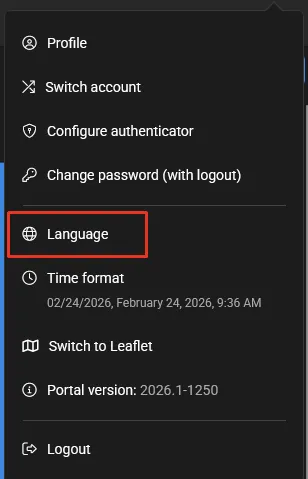
Selecting this will expand the updated list of languages supported.
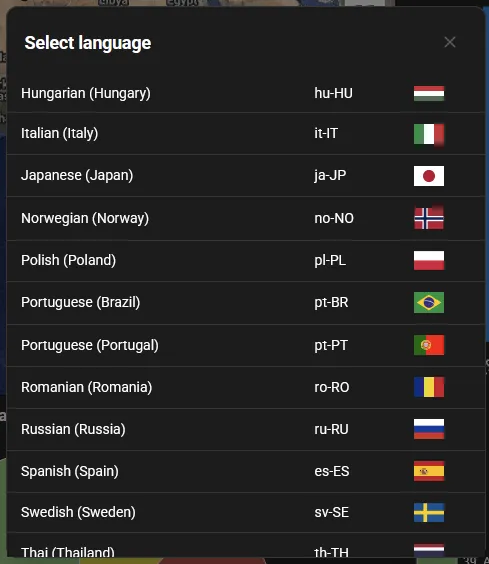
Additional language support includes:
- Romaninan
- Swedish
- Czech
- Polish
- Danish
- Hungarian
- Italian
- Dutch
- Norwegian
- Turkish
- Finnish
What's improved?
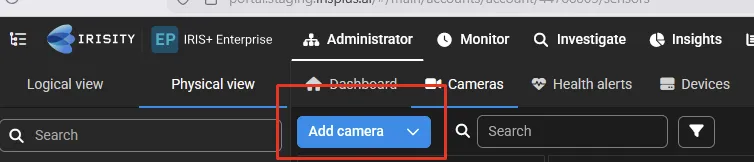
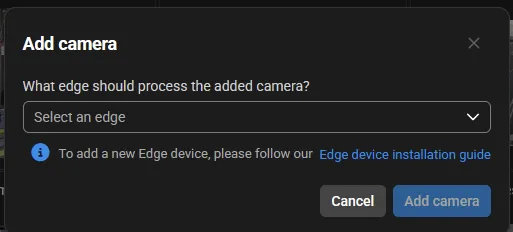
Improved flow for adding camera to an edge device
We've updated the way a user can add a camera to an edge device. This has been adjusted to provide a quicker path for users to add cameras, with a view of which available edge devices can be selected from. This can be found at the top left corner of the screen right under the secondary tabs. This can be accessible in both logical and physical view within the camera tree.
Improved smoke & fire detection
Our smoke & fire analytics has undergone an improvement for this release as well. The model used for smoke & fire detection has been further trained with more relevant data to enhance the detector's ability to recognize a wider range of smoke & fire cases and situations.
What's fixed?
This version includes fixes for the following issues reported in production:
- Brazilian Portuguese language was incorrectly translating into Portuguese
- Credentials were missing when typing in username and password of the device manager
- Tabs were found missing when switching to different languages
- Prompt search was incorrectly limiting 64 characters instead of 64 prompts
- Broken logo found at the top left of the screen
- PDF Export of events in monitor was exporting JSON format instead of PDF format
- 2-Factor Authentication link were found to be broken and unusable
- Face image upload was showing error messages when attempting to upload into a watchlist for face recognition
- New watchlists were not creatable and caused the page to error out
- Face recognition could not recognize a face when there's multiple faces detected in a single image frame
- Anomaly sent more alarms than configured
- Prompt search incorrectly translated objects when changing system language